
Managing time zones with Philippine teams can feel overwhelming, especially with a 12–15 hour difference from the U.S. However, with the right strategies, this challenge becomes an opportunity for 24/7 productivity. Here’s how you can make it work:
- Understand Philippine Standard Time (UTC+8): It doesn’t change for Daylight Saving Time, so U.S. managers must adjust schedules in March and November.
- Leverage Overlap Hours: Use the limited 2–8 hours of overlap for critical tasks like meetings and decision-making.
- Set Clear Communication Protocols: Use tools like Slack for real-time updates and Asana for task tracking. Define response times and work schedules in Service-Level Agreements (SLAs).
- Create Efficient Workflows: Use the "follow-the-sun" model for seamless task handoffs. Assign work at the end of your day and receive updates by morning.
- Respect Work-Life Balance: Establish fixed schedules, rotate meeting times, and acknowledge Philippine holidays to maintain morale.
- Use Technology: Tools like Google Calendar, World Time Buddy, and Hubstaff simplify scheduling, task tracking, and payroll.
The Story Behind My Remote Team and Our First In-Person Meeting!
Understanding Philippine Standard Time (PST) and Its Business Advantages
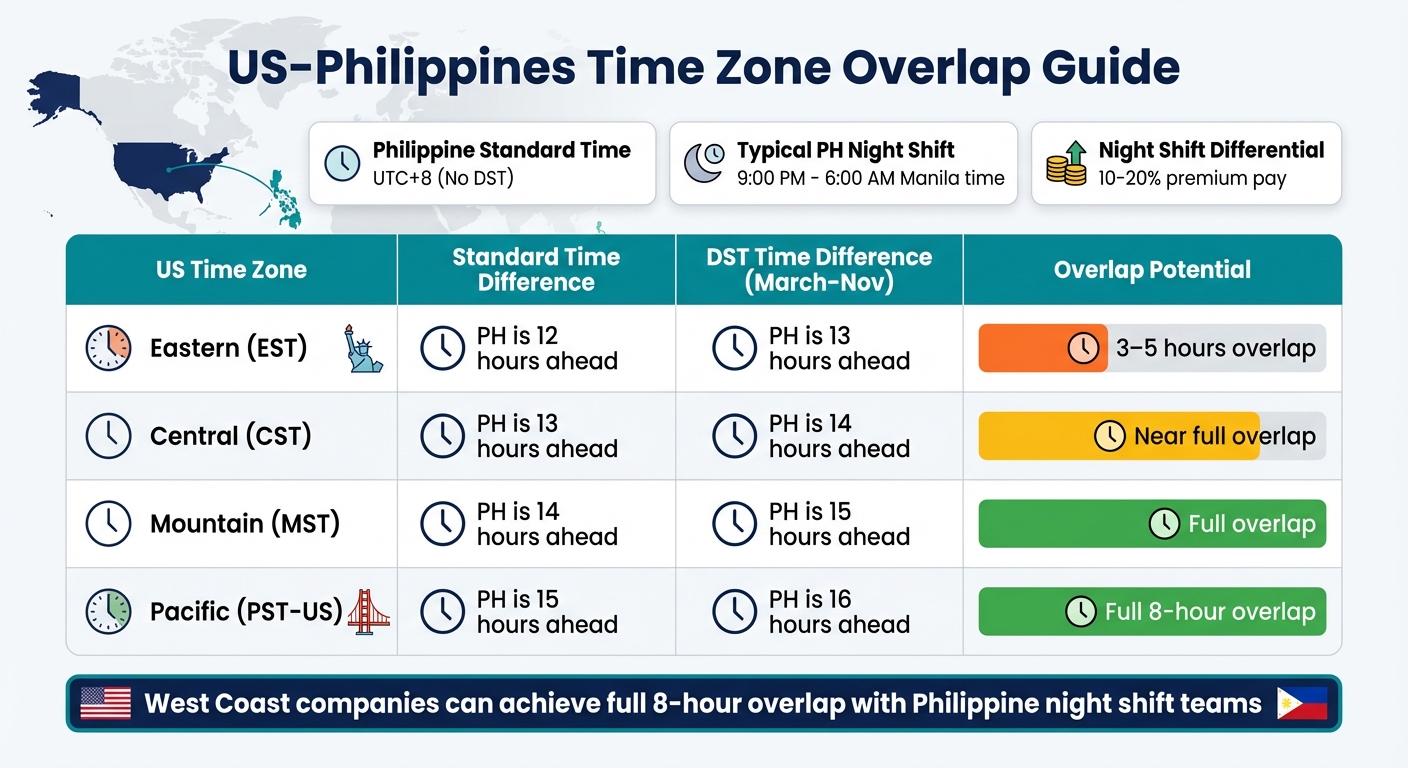
US-Philippines Time Zone Overlap Guide by Region
Philippine Standard Time (PST), set at UTC+8, stays consistent throughout the year. Unlike the United States, which shifts for Daylight Saving Time (DST), this stability means U.S.-based managers need to adjust meeting schedules by an hour in March and November. The Philippines shares its time zone with cities like Singapore, Hong Kong, Beijing, and Kuala Lumpur.
The time difference between the U.S. and the Philippines ranges from 12 to 15 hours, depending on the U.S. time zone and DST. While this might seem challenging, it’s actually a strategic asset. The Philippines has embraced a well-established night-shift culture, supported by 24/7 daycare centers, medical clinics tailored for late-night workers, and round-the-clock transportation and dining options. This infrastructure not only simplifies scheduling but also ensures smooth collaboration during overlapping work hours.
Time Zone Overlap with Major Markets
The time difference creates unique opportunities for real-time collaboration with U.S. markets. For example, West Coast companies working with Philippine teams on night shifts can enjoy a full 8-hour overlap. East Coast businesses typically have 3 to 5 hours of direct collaboration.
| US Time Zone | Standard Time Difference | DST Time Difference (March–Nov) | Overlap Potential |
|---|---|---|---|
| Eastern (EST) | PH is 12 hours ahead | PH is 13 hours ahead | 3–5 hours overlap |
| Central (CST) | PH is 13 hours ahead | PH is 14 hours ahead | Near full overlap |
| Mountain (MST) | PH is 14 hours ahead | PH is 15 hours ahead | Full overlap |
| Pacific (PST-US) | PH is 15 hours ahead | PH is 16 hours ahead | Full 8-hour overlap |
To align with U.S. business hours, many Philippine teams work from 9:00 PM to 6:00 AM local time. This schedule creates what’s often called "golden hours", where overlapping work windows allow for live collaboration and agile workflows. Additionally, Philippine labor laws require a Night Shift Differential of 10% to 20% for work performed between 10:00 PM and 6:00 AM. Competitive employers often go beyond this, offering 15% to 20% plus additional allowances.
Faster Project Turnarounds
The time difference also enables a "follow the sun" model, allowing work to continue seamlessly across time zones. Tasks assigned at the end of the Western workday are completed overnight in the Philippines, with results ready by morning. This approach ensures round-the-clock productivity and significantly reduces project turnaround times.
"Filipino remote workers actually prefer US time zones. While Latin America often gets top billing for ‘same-day’ time zones, the Philippines has quietly built a workforce that doesn’t just tolerate the night shift. It thrives in it." – Bene De Ramos, Penbrothers
This setup is especially effective for back-office functions like data processing, report generation, and administrative tasks. By advancing projects overnight, Philippine teams help businesses achieve up to 70% cost savings compared to onshore hiring. These time zone advantages create a strong foundation for effective communication and workflow strategies, which will be explored further in the next sections.
Setting Up Clear Communication Protocols
Managing a 12–15-hour time difference requires a well-defined communication framework. Without clear protocols, teams may face delays waiting for responses or risk missing important updates.
Selecting Communication Tools
Start by organizing your tools based on their purpose. For real-time collaboration during overlapping hours, consider platforms like Slack, Microsoft Teams, or Zoom. These are great for brainstorming, urgent problem-solving, and quick check-ins. For less urgent communication, asynchronous platforms like email or project management tools such as Asana or Trello work well for tracking tasks. Tools like Loom can be particularly helpful for creating screen-share tutorials that your team in the Philippines can review during their shift, eliminating the need for live instruction.
For emergencies, designate a specific channel – like WhatsApp, Telegram, or Viber – and make sure teams use it exclusively for urgent issues.
Creating Service-Level Agreements (SLAs)
An SLA acts as a communication playbook. Before starting a project, set clear expectations for response times based on the platform. For instance, you might require responses to Slack messages within two hours during overlap hours, but allow up to 24 hours for email replies. Clearly define work schedules – if your Philippine team is expected to work from 9:00 PM to 6:00 AM Manila time to align with your business hours, make that explicit from the start.
"Communicate your requirements to your service provider and include them in the service-level agreement (SLA) before finalizing the partnership." – Unity Communications
SLAs should also detail handoff procedures. Specify how completed work should be documented, the format for daily updates, and how to flag issues that need attention. These procedures minimize back-and-forth communication and keep productivity on track despite time zone differences.
By setting these guidelines, you can balance real-time and delayed communication effectively during overlapping hours.
Balancing Real-Time and Delayed Communication
Once SLAs are in place, prioritize overlap hours for critical, real-time interactions. Even one to two hours of overlap can be invaluable for tasks like performance feedback, complex problem-solving, and team alignment meetings. Save asynchronous methods for updates that don’t require immediate input. For example, instead of scheduling a meeting to explain a task, record a short Loom video for your Philippine team to watch during their shift. They can then provide a status update for you to review the next morning.
This approach ensures that time zone differences don’t disrupt productivity or require off-hour work. Rotate meeting times when possible so that one team isn’t always burdened with early-morning or late-night calls. Always specify deadlines with the time zone (e.g., "5:00 PM EST" or "9:00 AM PHT") to avoid confusion.
Structuring Workflows Around Time Zone Differences
The time difference between the U.S. and the Philippines – ranging from 12 to 15 hours – doesn’t have to be a hurdle. With smart planning, you can actually use this gap to boost productivity. The trick is to structure workflows so that work progresses seamlessly, even when teams are on opposite sides of the clock, without anyone sacrificing their personal time.
Using Overlap Hours for Priority Tasks
Make the most of the limited overlap hours by focusing on tasks that require real-time interaction. For example, if you’re on the East Coast, you might only have one or two hours of overlap in the early morning (around 8:00 AM EST, which is 9:00 PM PHT). Use this time for activities like video calls, urgent decision-making, performance reviews, or team-building discussions.
Save tasks like coding, data entry, or documentation for non-overlap hours, allowing your team in the Philippines to work uninterrupted.
"Task delegation becomes an art form when you’re managing a team that’s awake while you’re asleep." – Michael Brodie, Founder of VirtualStaff.ph
To keep things fair, rotate meeting times occasionally so no one is stuck with inconvenient calls every time. This approach ensures that synchronous communication is meaningful while respecting everyone’s work-life balance. From there, it’s all about perfecting task handoffs for smooth transitions.
Task Handoff and Documentation Methods
A "follow the sun" workflow lets your team keep the momentum going across time zones. At the end of your business day, assign tasks to your Philippine team. They’ll work during their shift, and by the time you’re back online, completed tasks are waiting in your inbox.
"Documentation ensures clarity, reduces dependency on live communication, and helps offshore teams work independently without constant supervision." – Global Edge
Clear documentation is essential here. It allows your team to work independently and make decisions without needing constant input. Set clear guidelines on what decisions they can make on their own, so minor issues don’t stall progress during your off-hours. This autonomy not only speeds up workflows but also builds trust and confidence within the team.
Tracking Progress and Setting Deadlines
For this system to work, you need visibility into task progress across shifts. Tools like Asana and Trello provide real-time updates on task status, while time-tracking platforms like Toggl Track or Clockify help monitor working hours and task completion.
Assign tasks early enough so your Philippine team can start their shift without waiting for further instructions. Require daily or weekly updates to ensure alignment with your goals and to maintain accountability. This keeps everyone on the same page and ensures that time zone differences don’t lead to missed deadlines.
sbb-itb-5665bbf
Creating Flexible Schedules for Philippine Teams
After setting up workflows that bridge time zones effectively, the next step is crafting schedules that cater to both business goals and your Philippine team’s well-being. Striking this balance not only boosts productivity but also safeguards morale and prevents burnout.
Maintaining Work-Life Balance
Flexibility doesn’t mean being available every hour of the day. Establish clear online hours and designated off-times upfront. This approach prevents unrealistic expectations of constant availability and promotes healthier routines.
For team members working night shifts to align with U.S. business hours, maintaining consistency in their schedules – even on weekends – can help their bodies adapt to the reversed routine. Encouraging this consistency supports better sleep patterns and overall health.
Acknowledging Philippine national holidays and local traditions is another way to show respect and foster long-term loyalty. Once these boundaries are in place, you can explore scheduling strategies that ensure uninterrupted coverage without overwhelming your team.
Implementing Rotating Shifts for 24/7 Coverage
To maintain around-the-clock support while protecting personal time, rotating shifts are an excellent solution. A "follow the sun" model, where tasks are seamlessly handed off between shifts, ensures continuous progress.
Offer shift options that align with business needs but also consider individual preferences. Some team members might favor day shifts (local Philippine time), while others may be comfortable with mid-shifts or night shifts that align with U.S. or U.K. hours. Split shifts can also be a useful option, allowing for overlapping hours during critical parts of the day without overextending anyone.
Introduce core hours, a set 2- to 4-hour block when all team members are online simultaneously, regardless of their primary shift. This guarantees a window for real-time collaboration while still allowing flexibility for the rest of the workday.
Using Technology to Manage Cross-Time Zone Work
Once you’ve set up flexible schedules, having the right tools becomes essential. The tech you choose can make or break your team’s ability to collaborate effectively, avoiding miscommunication and missed deadlines.
Scheduling and Calendar Tools
For most teams working across time zones, Google Calendar is a go-to solution. It allows you to enable a Secondary Time Zone (found under Settings > Time Zone > Display secondary time zone), so you can keep track of Philippine Standard Time alongside your local hours. Adding a world clock to your sidebar also makes it easy to check Philippine time without switching tabs. Since the Philippines doesn’t observe Daylight Saving Time, Google Calendar automatically adjusts for seasonal changes in other regions.
World Time Buddy is another helpful tool, providing a visual slider that simplifies finding overlapping work hours. For external meetings, Calendly eliminates scheduling headaches by displaying your availability in the invitee’s local time zone. The Standard plan costs $10 per seat monthly, while the Teams plan is $16 per seat monthly. If you want to rotate meeting times fairly across global teams, Cal.com offers features to distribute inconvenient hours.
To avoid confusion, always specify times with their respective time zones – e.g., "5:00 PM PST" – so everyone is on the same page. If team members in the Philippines can’t attend live sessions due to large time differences, you can use tools like Fireflies to record meetings.
But scheduling is just one part of the equation. Managing tasks effectively is equally important.
Project Management Platforms
Platforms like Asana, Trello, and Monday.com act as centralized hubs where task progress is visible round the clock, making them ideal for asynchronous workflows. These tools allow your Philippine team to focus on deep work without constant interruptions for real-time check-ins. They’re also great for passing tasks between time zones during shift changes, keeping projects moving forward.
Setting clear due dates and times that translate across time zones is key to avoiding missed deadlines. Automated status prompts, such as "What did you do today?", give managers a quick overview of progress without requiring live meetings. Additionally, features like digital whiteboards and shared cloud storage create collaborative spaces where ideas can be developed asynchronously.
IBM reported a 25% productivity boost over three years by using project management tools to coordinate a remote workforce spanning 170 countries. To get the most out of these tools, use the 3–4 hours of overlap for synchronous tasks like brainstorming, and reserve non-overlap hours for independent work.
To ensure accountability across shifts, time tracking tools can complement these platforms.
Time Tracking and Transparency Tools
Time tracking tools like Hubstaff and Time Doctor provide the transparency needed for remote teams. Hubstaff, trusted by over 112,000 businesses, tracks time across multiple devices and generates automated timesheets. It also includes productivity metrics like keyboard/mouse usage, URL tracking, and screenshots. Meanwhile, Time Doctor offers AI-powered analytics through "Benchmarks AI", which compares team performance to industry standards and flags signs of burnout.
"My people need to document their work so that I can have visibility into what they did during the day. Using Hubstaff reduces the meeting time I needed and gives me clarity."
– Brian Dordevic, Director of Strategic Planning
Companies like Phoenix Virtual Solutions have seen a 35% efficiency boost by using Time Doctor to improve productivity and cost-effectiveness. Similarly, SmartBuyGlasses achieved a threefold increase in team performance and reduced compliance issues by 50%–75% through Time Doctor. These tools also integrate with payment systems like Wise, PayPal, and Deel, automating payroll based on tracked hours and minimizing errors in cross-border payments.
Activity tracking features can detect idle time, ensuring that logged hours reflect actual work. Detailed timesheets simplify the approval process for global teams. Hubstaff even offers a free 14-day trial, no credit card required, so you can test its capabilities risk-free.
Measuring Performance and Adjusting Your Approach
Having the right tools is only part of the equation. To truly succeed, you need to regularly evaluate how well your time zone management strategies are working and adjust them based on performance data.
Key Performance Indicators (KPIs) for Time Zone Management
KPIs should align with specific roles. For example, in customer support, key metrics might include first response time (aim for ≤1 hour), customer satisfaction scores (target ≥85%), and resolution rates (≥90%). In software development, you might focus on code commit frequency (3–5 commits per week), bug resolution time (≤24 hours for critical issues), and sprint completion rates (≥95%). For project managers, on-time delivery (≥90%), budget variance (within ±5%), and stakeholder satisfaction (measured through quarterly surveys) are effective metrics to track.
It’s also important to monitor overall communication metrics, such as response times during overlap hours, clarity of task handoffs, and compliance with contracts or SLAs. Teams leveraging time zone-aware tools have reported a 15–20% reduction in project delays, while real-time metrics dashboards can speed up issue resolution by 32%.
"Since KPIs differ by service agreement, focusing on the wrong ones can lead to frustration. To avoid this issue, start with recruitment and HR-related KPIs, such as candidate quality and retention."
– Nico Chiong, Manila Recruitment
Adjust KPIs to reflect realistic expectations. For instance, expecting instant replies at 3:00 AM Manila time is unreasonable and can harm morale. Instead, evaluate deliverables on a 48-hour cycle to account for time differences. Use these metrics to guide regular reviews and refine your approach as needed.
Conducting Regular Process Reviews
Schedule quarterly reviews and weekly one-on-ones to evaluate goals, address bottlenecks, and provide immediate feedback. Use SLAs and project management data to identify inefficiencies. Log data can highlight areas where collaboration stalls or tasks are delayed. For example, a 19% boost in sprint velocity after improving task handoffs can signal that your adjustments are paying off. If bug resolution times slip beyond 24 hours, consider revisiting how developers access support during their shifts.
"Identify improvement areas and adjust processes."
– Dion Jay Tality, Content Strategist, Unity Communications
Update your SLAs regularly as performance data evolves – what works in the first month might not be effective six months later. Additionally, plan ahead for Daylight Saving Time changes in the U.S., as these can alter overlap hours with the Philippines depending on the season.
These reviews provide a foundation for gathering actionable team feedback.
Gathering Team Feedback
Quantitative metrics are essential, but they only tell part of the story. To get the full picture, collect qualitative feedback from your Philippine team about time zone challenges. Create dedicated channels where team members can openly share their concerns. Tools like Loom or recorded video messages allow for asynchronous feedback during their working hours. Anonymous suggestion boxes or feedback forms can also surface issues that might not come up in live meetings.
"Encouraging your offshore team members to share their concerns or challenges related to time zone differences fosters a culture of transparency."
– Lawrence Barrett, Partner, Manila Recruitment
During the limited overlap hours, prioritize high-value feedback sessions over routine updates. Use this time to discuss major wins and gather suggestions for improving workflows. Interestingly, qualitative communication scores have been shown to predict project risks with 19% greater accuracy, proving that soft feedback can be just as impactful as hard metrics. Incorporate feedback about local holidays and customs to ensure timelines are both realistic and respectful.
Conclusion
Effectively managing Philippine time zones can turn the 12-to-15-hour time difference with North America into a powerful advantage. With the right strategies – like setting clear communication practices, using asynchronous tools, and respecting work-life balance – you can harness the "follow-the-sun" model to keep your operations running around the clock without overburdening your team.
For example, companies that create a 2–4 hour overlap window for real-time collaboration often cut task turnaround times from 24–48 hours to just 12–18 hours. This can lead to a 150% productivity boost, which can climb to 200% with well-coordinated handoffs and standardized workflows. It’s not just about speed; it’s about smarter task allocation – matching the right work to the right time slot.
"Time zones are no longer limitations. They have become opportunities – opportunities for businesses to run smarter, serve better, and grow faster in an interconnected economy."
– Larry Mercado, Outsource Philippines
To make the most of this approach, pinpoint your "golden hours" when schedules overlap and use them for high-impact tasks like brainstorming or approvals. Save non-overlap hours for independent work, such as data entry or writing. With 78% of remote tasks being successfully completed asynchronously, there’s no need to force real-time communication when it isn’t necessary.
FAQs
How can I communicate effectively with my team in the Philippines despite the time difference?
To keep communication smooth with a team based in the Philippines, it’s important to find overlapping hours between your time zones. This allows for real-time discussions when needed. For instance, scheduling meetings in your late afternoon or evening often works well with their working hours. Tools like Google Calendar or World Time Buddy are great for pinpointing these overlaps and planning accordingly.
When live conversations aren’t an option, asynchronous communication becomes essential. Use platforms like email, Slack, or project management tools to keep everyone on the same page. Make sure to outline clear expectations around response times and working hours to avoid any misunderstandings.
Building trust and accountability is also key. Stay flexible when circumstances arise, and schedule regular check-ins to ensure everyone remains aligned. These steps will help create a seamless workflow, even across time zones.
What are the best tools for managing tasks with a team in the Philippines across time zones?
Managing tasks across different time zones becomes much simpler when you have the right tools at your fingertips. World clock apps such as World Time Buddy or the time zone feature in Google Calendar are incredibly handy for comparing and converting time zones. These tools make it easy to identify overlapping work hours, which is crucial for scheduling meetings and setting deadlines that work for everyone.
When it comes to communication, the approach can vary depending on the situation. For asynchronous collaboration, platforms like Slack or email work wonders, allowing team members to contribute at their convenience. On the other hand, tools like Zoom or Microsoft Teams are perfect for real-time discussions during shared working hours. By using a mix of these tools, you can keep communication flowing, stay productive, and ensure smooth teamwork, even when separated by time zones.
How can I support my Philippine team working night shifts to maintain work-life balance?
Helping your team in the Philippines navigate the challenges of night shifts starts with creating a supportive and adaptable work environment. First, make sure they’re fairly compensated and provided with benefits that acknowledge the unique demands of working non-traditional hours.
Consider offering flexible scheduling – allowing employees to pick shifts that better suit their personal routines. This small adjustment can ease stress and boost overall morale.
Promoting healthy habits is another important step. Encourage your team to practice good sleep hygiene, eat balanced meals, and stay physically active to help mitigate the impact of disrupted sleep cycles. Pair this with mental health support, such as access to counseling or regular one-on-one check-ins, to address any emotional or psychological challenges they may face.
Lastly, use scheduling tools to manage workloads effectively and ensure everyone gets adequate rest between shifts. By fostering a workplace culture that prioritizes understanding, care, and flexibility, you can help your team not just cope but thrive, even with the demands of night shifts.